Making a desktop music player with Godot
As I write this I’m listening to music playing through a Windows desktop app I wrote in GDScript, using the game engine Godot, called Hum. It’s not perfect, and I probably wouldn’t recommend the tradeoff to anyone else, but it is possible to write GUI apps in Godot.
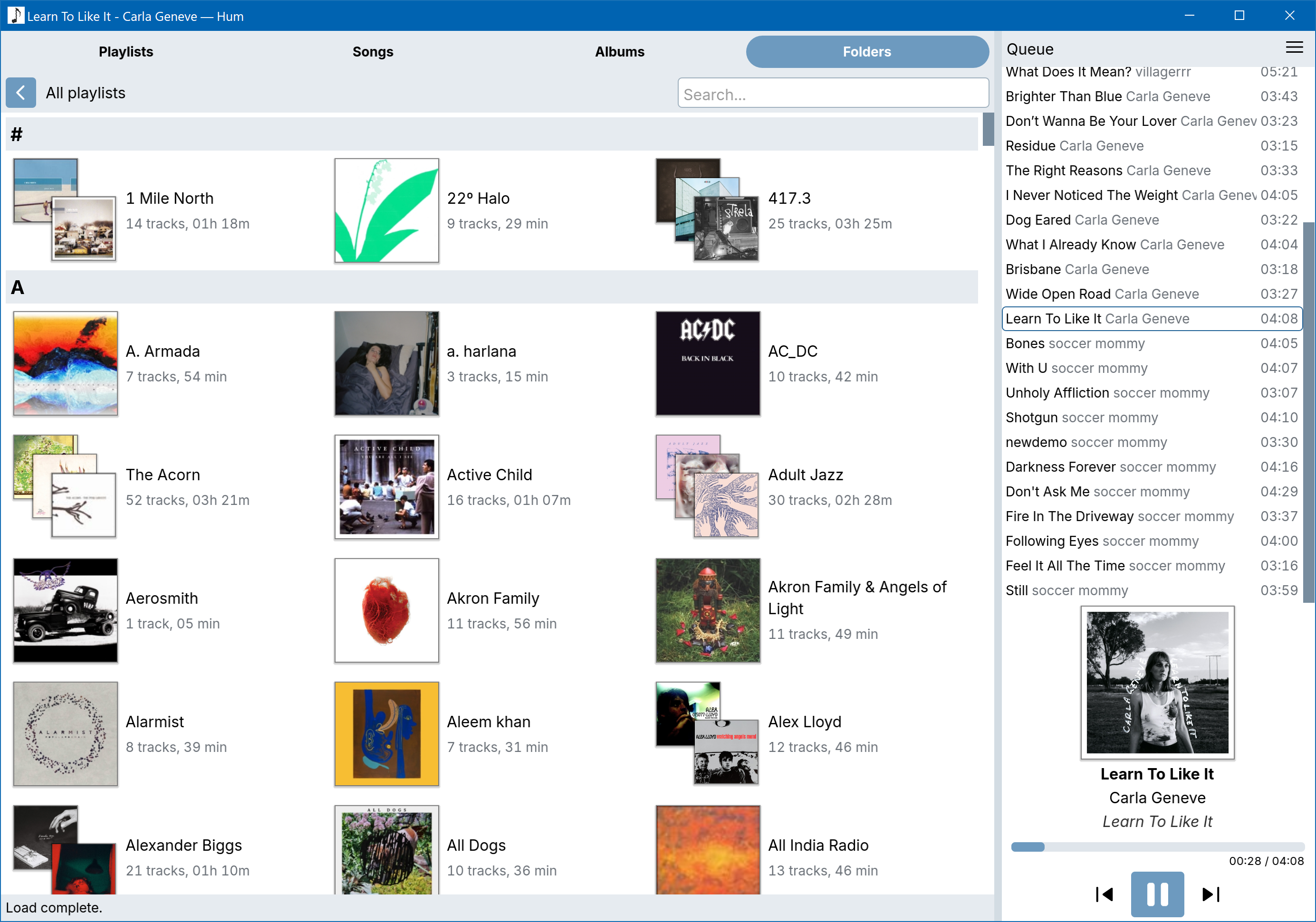
I’ve been trying to write this app for years—a spiritual successor to Windows 7’s Windows Media Player, my favourite music app ever—and I previously had a version in Rust using Iced, but the last Iced update broke it and hasn’t yet fixed the regression, so I tried again in Godot. I already love it for game development, so it seemed worth trying.
So that I don’t bury the lede: I don’t actually think the tradeoffs are worth it as it stands, and when I can I’ll be having another go at moving back to something written in Rust.
With that out of the way, let’s talk about Godot. Although it’s a novel choice to write an app in a game framework, on the surface there’s a lot to recommend it: cross-platform support and compilation, a substantial UI library built-in, a friendly ergonomic language in GDScript, decent performance, and the fact that Godot itself is made with Godot. If they can do it, surely we can too! It can also handily build a single binary with all its assets packaged inside, if you so desire. I’m using a sqlite integration, so in that case its dll has to be included separately.
With a media player app, I have specific needs that have made it hard to find a GUI framework that covers everything and is performant. I need to display a dynamic grid of album art images inside a scroll view that all need to be loaded from disk. I have a table thousands of items long in the song list view. I need to be able to play audio on a background thread and set its priority to realtime so that it doesn’t stutter under CPU load. Godot can do most of this fairly well, actually, it’s just let down in the places where it, understandably, is more focussed on games than GUI apps.
Everything is composable via Godot’s “scene” objects which are trees of visual or functional elements, like buttons or AudioPlayers, with optional scripts attached. I really love how this works for game development and it’s similarly nice to use for an app. Not all the UI elements I need exist, though—I’m using Godot’s Tree to try to fake a table layout, and it works just well enough, but can’t handle thousands of items.
Accessibility support seems to be good, though I haven’t tested it with a screen reader. By default everything is keyboard navigable. Built-in scroll views can be navigated up and down with Page Up and Down and so on, which I quite appreciate.
Styling the UI is good and bad. Nearly everything about each UI element can be customised, and your “theme” can be saved and applied across different elements. However, it may as well be impossible to handle light/dark modes or other overall app themes because of how theming works: theme files apply the same settings to all elements of the same type that they cover, so if you want, let’s say, rounded and square buttons, those need different theme files. If you want a “panel” that’s one colour in one spot and another in a different spot, those need different themes. If you want different spacing between list items in the sidebar compared to the main panel, that’s a separate theme, and so on. Add all this up and then multiply it by each different overall theme you want to apply and it’s just too much work. (Maybe I’ve missed something?) It’s also worth noting that the UI doesn’t look native on any platform, but of course it doesn’t—it’s not made for that. Windows is an overflowing rubbish bin of UI anyway so it’s hardly even noticeable.
There’s no built-in SVG support so everything has to become a raster image. HiDPI support is there, but isn’t explicitly handled, so you have to set the scale of your UI to match the desktop scaling yourself. By default the app will keep the screen on, and it of course renders via the GPU so I occasionally hear my GPU spin up its fans just because I’ve got music playing, which gets annoying. It doesn’t use a lot of RAM, but all the images loaded seem to go into VRAM and stay, so it does seem to use a few gig there. Native dialog windows don’t scale to match the default UI scale, which seems like a bug, so I’ve had to use the “fake” dialogs that are stuck inside the parent window.
Finally, GDScript is “good enough” in terms of performance for most things, but it has issues. I found a few ID3 tag parsing libraries written in GDScript, which was really handy, but they’re all horribly slow, and super flaky as GDSCript is not great for parsing binary files. I eventually had to bite the bullet and add .NET support to my project in order to pull in a C# dependency, which at least has the benefit of feeling about 10x faster at reading an MP3 file. If I stuck with Godot, I’d end up switching to a C# library for working with Sqlite too. I’m using a GDScript library there that’s not very ergonomic, and also seems to be very slow and have concurrency issues, although that might just be me.
GDScript, like its inspiration Python, is very loosey-goosey in a way that feels fraught since I’ve started writing Rust in earnest. That’s probably the biggest negative, in that I feel like there’s no rigour in my code base compared to something with stronger types that is actually made for GUI output. Making the UI is a nice experience, but wiring it together with code is less so. It’s easy and approachable to get started with, but feels like a mess once it starts expanding.
For a simpler desktop app or one with different constraints, I’d say it’s definitely surprisingly viable to use Godot. For me, it’s workable for now, but I won’t stick with it.
If you’re interested in playing with what I have for Hum so far, I’ve put the source up on Codeberg.